The Short Answer for Busy Directors
AI in museums currently falls into eight working use cases: AI art discovery and visual search, automated cataloguing, personalised recommendations, multilingual chat guides, footfall and visitor analytics, conservation monitoring, accessibility features, and back office automation. Most museums start with one narrow use case, test it with real visitors, and expand only after it proves useful.
What Does AI in Museums Actually Mean?
The label covers several different technologies, and mixing them up leads to poor purchasing decisions. In our project work, artificial intelligence in museums usually means one of four things:
- Computer vision: software that matches photographs to object records, recognises shapes, and groups similar images
- Natural language tools: chat guides, translations, and summaries generated from approved curatorial text
- Recommendation systems: related artwork suggestions and personalised visit routes
- Prediction models: footfall forecasts, demand planning, and maintenance alerts
Each family needs different data and different review rules. A director who can name which family a vendor is selling asks sharper questions.
Why Museum Leaders Are Moving Now
The audience has already decided. The American Alliance of Museums examined how visitors feel about this technology in its 2025 Annual Survey of Museum-Goers, which gathered responses from 98,904 museum-goers across 202 institutions. People use AI daily at work and at home, and they carry those expectations through the museum door.
Trust remains the sector’s core asset. Our position on AI in museums is direct: apply it where it supports staff judgement, label it clearly for visitors, and keep a named person responsible for every public output. Waiting for a perfect policy costs more than running one controlled pilot under clear rules.
Eight Real Ways Museums Use AI Today
1. AI Art Discovery: Search a Collection by Drawing a Shape
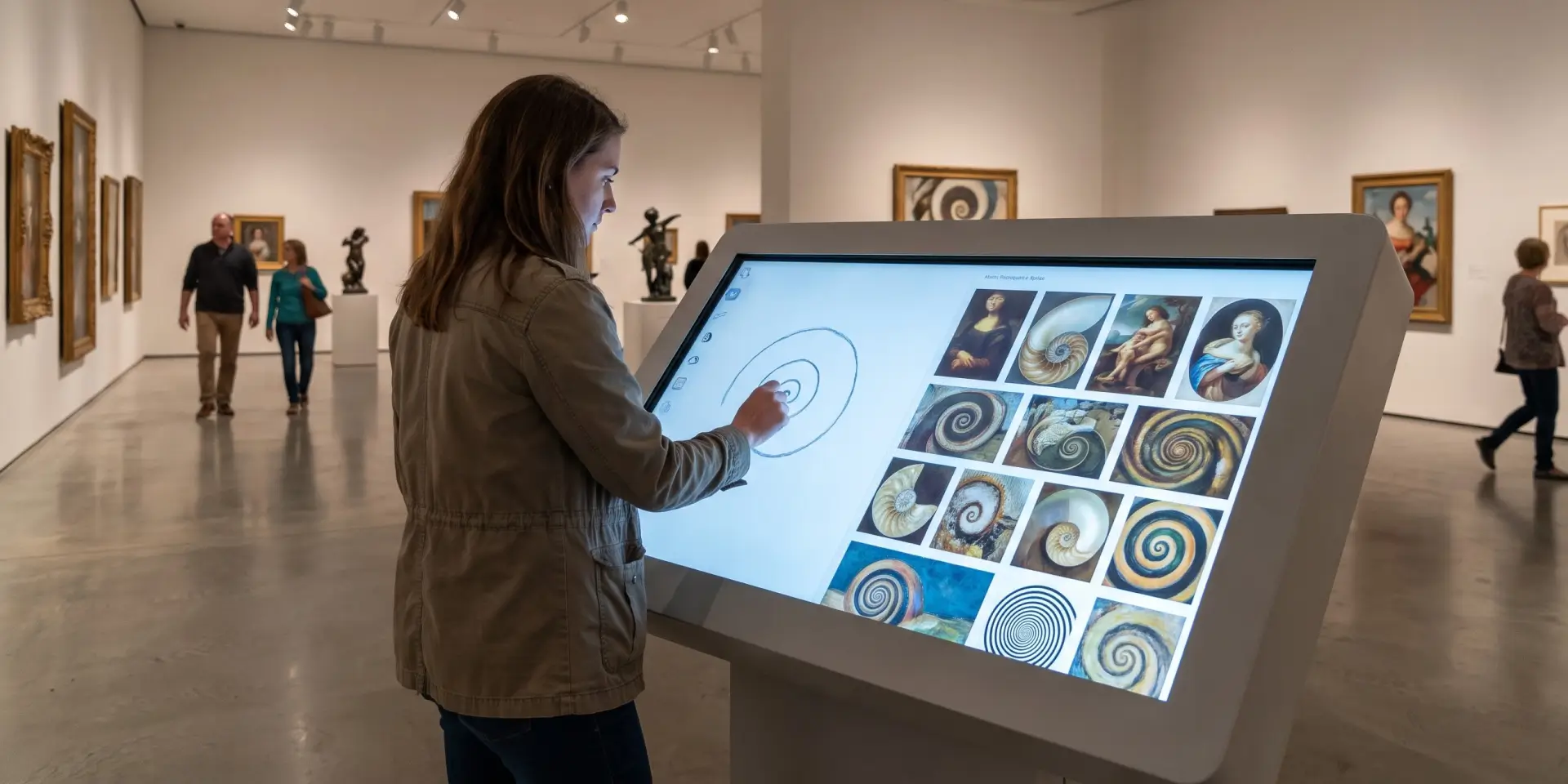
Keyword search fails visitors who cannot name an artist, a title, or a period. AI art discovery removes that barrier. For the Museum of Art and Photography, we built Draw to Search, an AI art discovery kiosk where a visitor sketches a curve, a spiral, or any shape on screen, and an image recognition engine returns the paintings that contain it.
Three facts from that project matter to any museum considering visual search:
- Scale: visitors search a collection of more than 20,000 artworks from a single hand drawn sketch
- Speed: the experience runs as a Unity application built to stay responsive on a busy gallery floor
- Learning: people absorb art styles and movements through the shapes that define them, before reading a single label
Our takeaway as builders: drawing pulls in first time visitors who would never open a collection catalogue. That is exactly the audience most museums say they want.
2. Cataloguing That Shrinks the Documentation Backlog
Documentation backlogs block everything else. AI museum tools now suggest object tags, flag duplicate records, and fill missing metadata fields for staff to review. The rule we apply on every digital museum project: structured, consistent records come first, because a model trained on messy data produces messy suggestions.
Staff stay in control. The software proposes, a registrar approves, and each approved decision goes back into the catalogue.
3. Recommendations That Treat Every Visitor Differently
Recommendation engines suggest related artworks, alternative routes, and follow up content based on what a visitor has already viewed. They work best inside interactive museum exhibits, where visitors make visible choices the software can respond to. The same AI museum tools help education teams draft themed trails for school groups in minutes instead of days.
4. Chat Guides That Speak the Visitor’s Language
Conversational guides answer questions from approved curatorial text and translate on demand. Character led guidance makes this feel natural. At the Dhari Experience Centre, which we built for a state forest department, a lifelike digital lion walks visitors through the wildlife and culture of Gir. Pairing a character like that with a conversational layer is the roadmap we now discuss with teams exploring artificial intelligence in museums for the first time.
5. Footfall Forecasts That Fix Staffing Before Queues Form
Prediction models read ticketing history, weather, holidays, and local events to forecast busy hours, so operations teams schedule staff against real demand. The same data shows which exhibitions actually increase museum footfall, which is the number most boards ask about first.
6. Conservation Alerts from Sensor Data
Sensor networks track humidity, light, and temperature around sensitive objects. AI in museums here means models that flag environmental drift before damage occurs and predict equipment failures early. Institutions that maintain a digital twin of a heritage building extend the same monitoring to entire structures.
7. Accessibility for Every Visitor
AI museum tools generate audio descriptions for visitors with low vision, live captions for deaf visitors, and plain language summaries for anyone who wants them. These features cost a fraction of what they did five years ago, and they widen the audience a collection can serve.
8. Back Office Agents for Tickets and Surveys
Search demand is already rising for museum ticket agents and survey agents. Early deployments answer routine ticketing questions, sort visitor feedback into themes, and draft donor communication for staff to edit. This is the least visible use of AI in museums and often the fastest to show a return.
We build in this layer ourselves. EveryTicket, our museum ticketing solution, gives institutions smart and custom ticketing designed around museum operations.
How to Start: A Five Step Order of Operations
Boards ask us where to begin. This sequence reflects what worked in our own museum projects:
- Pick one narrow use case: choose the AI museum tools that solve a single named problem, such as search, tagging, or forecasting
- Audit the data: confirm object records, image quality, and usage permissions before any vendor conversation
- Set review rules: name the person who approves every public output and list the subjects that need specialist sign off
- Pilot with real visitors: run the tool in one gallery or on one collection section for a fixed period
- Measure, then expand: keep the pilot only if the numbers justify it, and document what you learned either way
For governance questions at board level, the UNESCO dialogue on the role of artificial intelligence in museums gives trustees a reference point grounded in ethics, inclusion, and sustainability.
Work With a Team That Has Built This Before
Here is our track record in this sector. We built the Draw to Search kiosk described earlier, and it runs on a live gallery floor against a collection of more than 20,000 artworks. For CSMVS, we delivered four interactive digital experiences for the Network of the Past exhibition, and our content configurator lets museum staff publish digital exhibitions without writing code.
If your museum is planning its first AI pilot, talk to our team. We will map one use case from this article to your collection (or you can tell us how you would like to integrate AI in your operations) and give you an honest read on data readiness, cost, and timeline.
The Bottom Line
AI in museums rewards focus. The institutions getting results picked one use case, prepared their data, kept people in charge of public output, and measured the outcome. Start there, and the second project becomes far easier to choose.
FAQs
How is AI being used in museums?
The most common uses of AI in museums are visual search and AI art discovery, automated cataloguing, personalised recommendations, multilingual chat guides, footfall forecasting, conservation monitoring, accessibility features, and back office automation. Most institutions run one pilot first and expand after it proves useful with real visitors.
What is AI art discovery?
AI art discovery lets a visitor find artworks through shapes, sketches, or images instead of keywords. A visitor draws a shape, and computer vision returns matching pieces from the collection. It suits first time visitors and anyone who cannot name what they are looking for.
Will artificial intelligence in museums replace curators?
No. Artificial intelligence in museums works as an assistant. It proposes tags, drafts, translations, and matches, and qualified staff approve or reject every public output. Provenance, attribution, and culturally sensitive material always need named specialist review.
How much do AI museum tools cost?
Costs depend on scope. A single kiosk or chat guide sits at the lower end, while collection wide cataloguing platforms cost more. We advise museums to budget for a fixed term pilot first, because a pilot produces the usage data that justifies any larger investment.